Posts Tagged ‘eclipse’

If you missed anything after customising all email templates in Magento

Thursday, March 4th, 2010

To double check if you missed anything after customising all email templates in Magento, you can do a File Search on Selected resources (app/locale/(locale_code)/template/email in eclipse with these keywords:

  • (555) 555-0123
  • magento
  • demo

By the way, eclipse can do Replace on Selected resources, which is an equivalent tool of File & Replace in Folder using Notepad++. I am sure a single linux command can also do the job but I can’t remember the syntax. Let’s just use eclipse, straight forward.
Eclipse XML formatter

Monday, March 1st, 2010

Magento 有个我早就知道的 bug:读入 module config.xml 时,class name 必须在和 xml opening tag & closing tag 写在一行上,而且中间不能有 white space。这个 bug 直到最近的 Magento 1.4.0.1 都还有,可能 Magento 认为这不重要,重要的是如何书写 config.xml。所以我写 config.xml 一直都很小心。

<catalog>
	<rewrite>
		<convert_adapter_category>MyNamespace_MyModule_Model_Eav_Convert_Adapter_Category</convert_adapter_category>
	</rewrite>
</catalog>

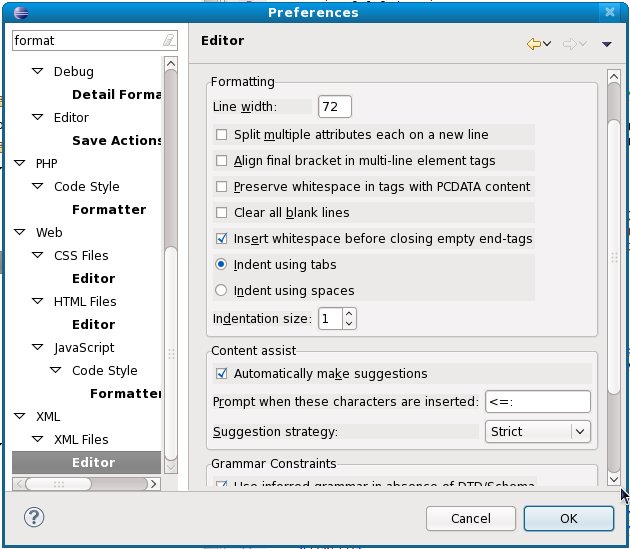
但最近一次写完了 config.xml 下意识地按了 Ctrl + Shift + F 格式化了 config.xml,而这一行很长,eclipse XML formatter 自动把它换行书写了,造成 Magento 无法正确读入 class name。页面出不来了,什么原因?!我花了差不多一天时间才找到原因,一看到是这个原因,我又非常地懊恼——都是因为我懒,没有好好设置 eclipse 为我所用。

Preferences for Eclipse XML formatter

Preferences for Eclipse XML formatter

于是亡羊补牢,我花了几分钟找到设置所在,把 Line width 设定一个足够大的数字就不怕它换行了。Aptana plugin 也带一个 Aptana XML Editor,另有地方设置,这里不多说了。